What Does the Density Enchantment Do in Minecraft: Mace Damage Mechanics
- Apr 13
- 10 min read
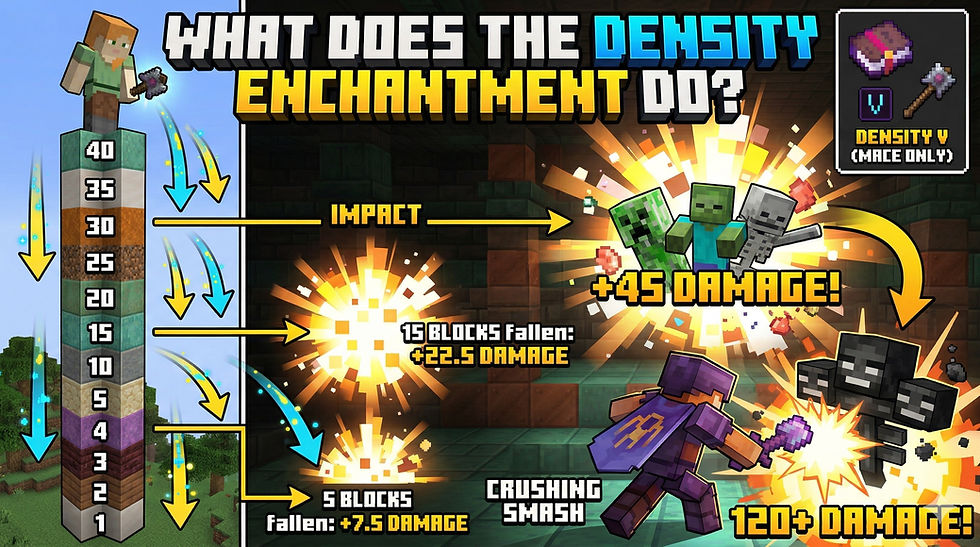
Minecraft's Density enchantment is exclusive to the mace weapon and changes how you approach combat by rewarding falling attacks. Density adds bonus damage to your mace based on how many blocks you fall before striking an enemy, with each level of the enchantment increasing the damage by 0.5 per block fallen. This makes it particularly effective for players who favor aerial combat strategies.
The enchantment transforms the mace into a devastating weapon when you time your attacks correctly. Unlike traditional melee enchantments that siply boost base damage, Density rewards positioning and tactical movement during fights.
Understanding how to obtain, apply, and maximize Density will help you build effective combat strategies around this unique enchantment. You'll learn the mechanics behind fall damage calculations, how to set up your enchanting system, and which other enchantments work alongside or conflict with Density.
How the Density Enchantment Works
Density is a mace-exclusive enchantment that amplifies the damage output of smash attacks based on how far you fall before impact. The enchantment scales from level I to level V, with each tier adding more extra damage per block fallen during aerial strikes.
What Density Does to Mace Smash Attacks
The density enchantment modifies your mace's smash attack by converting vertical momentum into devastating damage. When you fall and strike an enemy with the mace, the weapon performs a special smash attack that deals bonus damage based on your fall distance.
Without density, the mace already has innate smash attack capabilities. The enchantment enhances this mechanic by adding additional damage for every block you descend before landing the hit.
This makes aerial combat significantly more effective. You can position yourself above enemies and drop down to deliver crushing blows that scale with height.
Density Levels and Extra Damage Calculations
The density enchantment has five levels, each increasing the extra damage per block fallen:
Level | Extra Damage Per Block |
Density I | 0.5 damage (0.25 hearts) |
Density II | 1.0 damage (0.5 hearts) |
Density III | 1.5 damage (0.75 hearts) |
Density IV | 2.0 damage (1 heart) |
Density V | 2.5 damage (1.25 hearts) |
If you fall 10 blocks with Density V, you gain an additional 25 damage (12.5 hearts) on top of the mace's base smash attack damage. The damage accumulates quickly with greater heights, allowing you to eliminate tough mobs in a single strike from sufficient elevation.
Interaction With Fall Height and Gravity
Your fall height directly determines how much bonus damage the density enchantment provides. Falling from greater heights generates more smash attack damage, but you must balance this with fall damage risk to yourself.
The mace's smash attack negates fall damage when you successfully hit a target. This synergy makes density particularly effective, as you can drop from extreme heights without injury while maximizing your damage output.
Wind charges and other knockback effects can launch you into the air to set up density-enhanced smash attacks. This creates tactical opportunities to intentionally gain altitude during combat.
Difference From Other Enchantments
Density is unique to the mace and cannot be applied to swords, axes, or other weapons. It specifically enhances the smash attack mechanic rather than increasing general melee damage like Sharpness.
Unlike damage enchantments that provide flat bonuses, density rewards positional play and vertical movement. The enchantment scales infinitely with fall distance, whereas Sharpness caps at a fixed damage increase per level.
You can combine density with other mace enchantments like Breach, which reduces enemy armor effectiveness. This combination makes the mace extremely powerful against heavily armored targets when attacking from above.
Obtaining and Applying the Density Enchantment
You can acquire the Density enchantment through enchanting tables, enchanted books found in various structures, trading with librarian villagers, or using commands. Each method requires different resources and offers varying levels of accessibility depending on your game progression.
Enchanting With the Enchanting Table
You need a level 30 enchanting table setup to maximize your chances of obtaining Density. Surround your enchanting table with 15 bookshelves placed one block away to achieve maximum enchantment level.
Place your mace and lapis lazuli into the enchanting table interface. The enchantment options will appear based on your experience level. Since Density is specific to maces, it may appear as one of the available options, though you might need multiple attempts to get it.
The enchanting table method consumes experience points and lapis lazuli with each attempt. This approach works best when you have accumulated sufficient experience levels and resources.
Finding and Using Enchanted Books
Enchanted books with Density can be found in ominous vaults and trial chambers. These structures generate enchanted books as loot, making trial chambers particularly valuable for obtaining mace-specific enchantments.
You can also obtain Density enchanted books through fishing, though this method is less reliable. Once you have an enchanted book with Density, combine it with your mace using an anvil.
Place the mace in the first slot and the enchanted book in the second slot of the anvil interface. This process requires experience levels based on the enchantment level and the mace's prior work penalty.
Trading With Villager Librarians
Librarian villagers of any level can offer Density enchanted books as part of their trading options. You need to locate a librarian or create one by placing a lectern near an unemployed villager.
Each librarian has randomized trades that refresh when they access their lectern. You may need to trade with multiple librarians or reset their trades by breaking and replacing the lectern before they complete their first trade.
Trading requires emeralds as currency. Stock up on items that villagers accept for emeralds to facilitate multiple trading attempts.
Using Commands to Obtain Density
You can use commands to instantly obtain Density in creative mode or with cheats enabled. The command /enchant @s density <level> applies the enchantment directly to a mace you're holding, where <level> ranges from 1 to 5.
Alternatively, use /give @s enchanted_book{StoredEnchantments:[{id:"density",lvl:<level>}]} to obtain an enchanted book with Density. This method provides immediate access without gathering resources or experience points.
Commands are useful for testing, creative builds, or when you want to bypass traditional acquisition methods. Remember that using commands disables achievements in that world unless you're already in creative mode.
Crafting and Building Your Density Setup
To maximize the Density enchantment's potential, you need the right weapon, materials, and infrastructure. The mace serves as your primary tool, while strategic building creates opportunities for devastating fall attacks.
Crafting the Mace
You craft a mace using a heavy core and a breeze rod at your crafting table. Place the heavy core in the center slot and the breeze rod directly below it. This arrangement creates the only weapon compatible with the Density enchantment.
The mace differs from traditional weapons because it specializes in vertical combat rather than standard melee exchanges. Without a mace, you cannot apply or benefit from Density regardless of how many enchanted books you collect.
Essential Materials: Heavy Core and Breeze Rod
Heavy cores drop from ominous vaults found within trial chambers. You need to activate these vaults using ominous trial keys, which themselves require defeating challenging encounters. The drop rate isn't guaranteed, so prepare for multiple trial chamber runs.
Breeze rods come from breezes, hostile mobs that spawn exclusively in trial chambers. These flying enemies attack with wind bursts that knock you back. You'll need to defeat several breezes since they don't always drop their rods.
Both materials require you to explore and conquer trial chambers, making them mid-to-late game resources. Stock up on armor, food, and weapons before attempting these structures.
Optimizing Enchanting Table Setup
Your enchanting table needs 15 bookshelves arranged one block away to reach maximum enchantment levels. This setup unlocks Density at higher tiers, increasing your chances of obtaining better enchantment options.
Place bookshelves in a rectangle around your enchanting table, leaving one block of air between the table and shelves. You can stack bookshelves up to two blocks high. Torches or other blocks between the table and shelves will break the connection and reduce enchanting power.
Lapis lazuli fuels your enchantments, so maintain a steady supply. Trading with librarian villagers offers an alternative path to Density through enchanted books.
Creating Fall Platforms and Safe Drop Zones
Build elevated platforms 20-30 blocks high to generate significant fall damage bonuses. Each block fallen adds 0.5 damage per Density level, so height directly translates to power. Construct multiple platforms at varying heights for different combat situations.
Slime blocks placed at your landing zone negate fall damage while preserving your Density bonus. This allows you to execute high-damage attacks without risking your own health. Position slime blocks strategically around mob spawners or combat arenas.
Ladders or water elevators provide quick access back to your platforms between attacks. You can also build scaffolding for temporary height during exploration. Mark your drop zones clearly to avoid missing your target and taking unnecessary damage.
Using Density in Combat Situations
Density transforms the mace into a high-risk, high-reward weapon that demands strategic positioning and careful execution. Success depends on understanding which combat scenarios favor vertical attacks, how to combine Density with complementary gear, and how to survive the dangerous falls required to maximize damage output.
Best Combat Scenarios for Density
Density excels in environments with significant vertical terrain where you can gain height advantage over your targets. Mountain biomes, ravines, and player-built towers provide ideal combat zones for maximizing the enchantment's damage potential. The enchantment works identically in both Java Edition and Bedrock Edition, making it reliable across platforms.
Boss fights against the Warden benefit tremendously from Density attacks. A well-timed strike from sufficient height can deal devastating damage to this powerful mob. The Nether dimension offers natural height differences with its fortress structures and basalt deltas that create perfect ambush points.
Large mob groups become manageable when you can position yourself above them. The splash damage from mace smash attacks combined with Density's bonus damage lets you clear multiple enemies simultaneously. PvP scenarios favor players who control high ground and can force opponents into vulnerable positions below.
Synergy With Other Enchantments and Gear
Feather Falling boots are essential when using Density effectively. This armor enchantment reduces fall damage to you while preserving the full damage output of your mace attacks. Feather Falling IV allows you to execute strikes from lethal heights without risking death.
Wind Burst, another mace-exclusive enchantment, combines well with Density by launching you upward after successful smash attacks. This creates a repeating cycle of aerial combat where each strike propels you back into position for another devastating fall attack.
Your armor choice matters significantly. Full Protection IV armor stacks with Feather Falling to minimize the risks associated with high-altitude combat. Slow Falling potions offer an alternative approach, letting you control your descent speed and aim attacks more precisely, though they reduce your falling speed and thus your damage per block fallen.
Strategies for Surviving High-Fall Attacks
Calculate your fall distance carefully to balance damage output against personal safety. Each level of Density increases damage based on blocks fallen, but falling too far without proper protection will kill you regardless of your weapons' power.
Build quick scaffolding or pillar up using blocks before engaging dangerous mobs. This gives you immediate height advantage without requiring natural terrain features. Place water buckets at ground level as emergency landing zones if combat goes wrong.
Feather Falling boots reduce your damage taken by 12% per level, with level IV providing 48% reduction. Combined with the absorption from golden apples or totems of undying, you can survive falls that would otherwise be fatal. Practice timing your attacks to land precisely when reaching your target rather than overshooting into the ground.
Impact on Bosses, Mobs, and PvP
The Warden takes massive damage from properly executed Density attacks. A mace with Density V falling from 20+ blocks can deal enough damage to significantly shorten what would otherwise be an extremely difficult fight. The Wither and Ender Dragon also suffer heavily from aerial smash attacks when you position yourself above them.
Regular mobs like zombies, skeletons, and creepers become trivial threats when attacked from above. The damage per block fallen scales dramatically, often resulting in one-hit kills from moderate heights. Endermen present unique challenges since they teleport when attacked, potentially wasting your high-risk positioning.
PvP combat with Density rewards players who master vertical mobility. Your opponents wearing standard armor cannot withstand the amplified damage from height-based attacks. Counter-strategies include staying indoors, destroying pillars, or using their own ranged weapons to attack you during your descent when you cannot dodge.
Incompatibilities, Tips, and Unique Interactions
Density cannot be combined with certain damage enchantments, but understanding these limitations and leveraging compatible enchantments will help you build the most effective mace possible. Key differences between Java Edition and Bedrock Edition also affect how enchantment stacking works.
Enchantments Incompatible With Density
Density is mutually exclusive with Breach, Smite, and Bane of Arthropods. You cannot apply any of these enchantments to a mace that already has Density through normal gameplay methods like enchanting tables or anvils.
The incompatibility exists because these are all damage-modifying mace-exclusive enchantments designed to fill the same role. Breach increases damage against heavily armored targets, while Smite and Bane of Arthropods boost damage against specific mob types.
Sharpness and Impaling are also technically incompatible with Density, but you won't encounter this limitation in Survival mode since maces cannot normally receive these enchantments. Only through commands can you apply both to the same weapon.
In Java Edition, if you use commands to bypass these restrictions, the effects of multiple incompatible enchantments will actually stack together. This does not work in Bedrock Edition, where only one effect applies.
Maximizing Damage Output
To maximize your mace's damage potential, you need to increase your falling distance before striking. Each Density level adds 0.5 damage per block fallen, so falling from greater heights dramatically increases your smash attack damage.
Build or find tall structures to jump from when engaging enemies. The optimal Density level is V, which provides 2.5 additional damage per block fallen. When combined with the base falling damage multiplier of the mace's smash attack, you can deal devastating damage from heights of 20+ blocks.
Wind Burst synergizes exceptionally well with this playstyle by launching you upward after a successful smash attack, allowing you to chain multiple high-damage strikes. The enchantment essentially creates a bouncing effect that maintains your aerial advantage.
Consider your target's health and armor when choosing your approach height. Against weaker mobs, shorter falls may suffice, but tougher enemies require maximum falling distance to achieve one-shot kills.
Combining With Wind Burst and Other Mace Enchantments
You can safely combine Density with Wind Burst, Mending, Fire Aspect, Knockback, and utility enchantments without any conflicts. This allows you to create versatile builds that suit different combat scenarios.
Wind Burst is the most important companion enchantment for Density-focused builds. It launches you 3-7 blocks upward (depending on enchantment level) after each smash attack, enabling continuous aerial bombardment. This creates a self-sustaining loop where each hit sets up your next high-damage strike.
Mending helps maintain your mace's durability during extended combat sessions, which is essential since the high-risk aerial playstyle can lead to dangerous situations. Pair it with an XP farm or collect XP from defeated mobs to keep your weapon in top condition.
Fire Aspect adds damage over time and can help finish off enemies that survive your initial smash attack. Knockback provides additional crowd control, pushing enemies away if you need space to reposition for another aerial strike.
Relevant Version Differences
The primary version difference affects enchantment stacking through commands. In Java Edition, you can use commands to apply incompatible enchantments to the same mace, and their effects will stack together for increased damage output.
Bedrock Edition does not allow this stacking behavior. Even if you use commands to apply multiple incompatible enchantments, only one effect will function at a time.
For normal Survival gameplay, both versions handle Density identically. You obtain it from enchanting tables, ominous vaults, or librarian villagers, and the damage calculations remain consistent across platforms.
These differences only matter if you're creating custom maps, running commands for testing, or playing on modified servers. Standard tutorials and strategies for Density work equally well on both Java Edition and Bedrock Edition.


Comments